Workspace for life sciences.
Models, compute, data, and the research record in one workspace. Your agent reasons with it. Your work stays together.
An illustrative workflow: people and agents use Biosimulant to work with models, compute, data, experiments, results, evidence and the research journal. Requests can run individually or in parallel, returning context before the next decision.
Your research question
 Codex
Codex






Keep the experiment behind every result.
Model versions, inputs, settings and output files give a result its context. Keep them together so the work can be checked and continued.
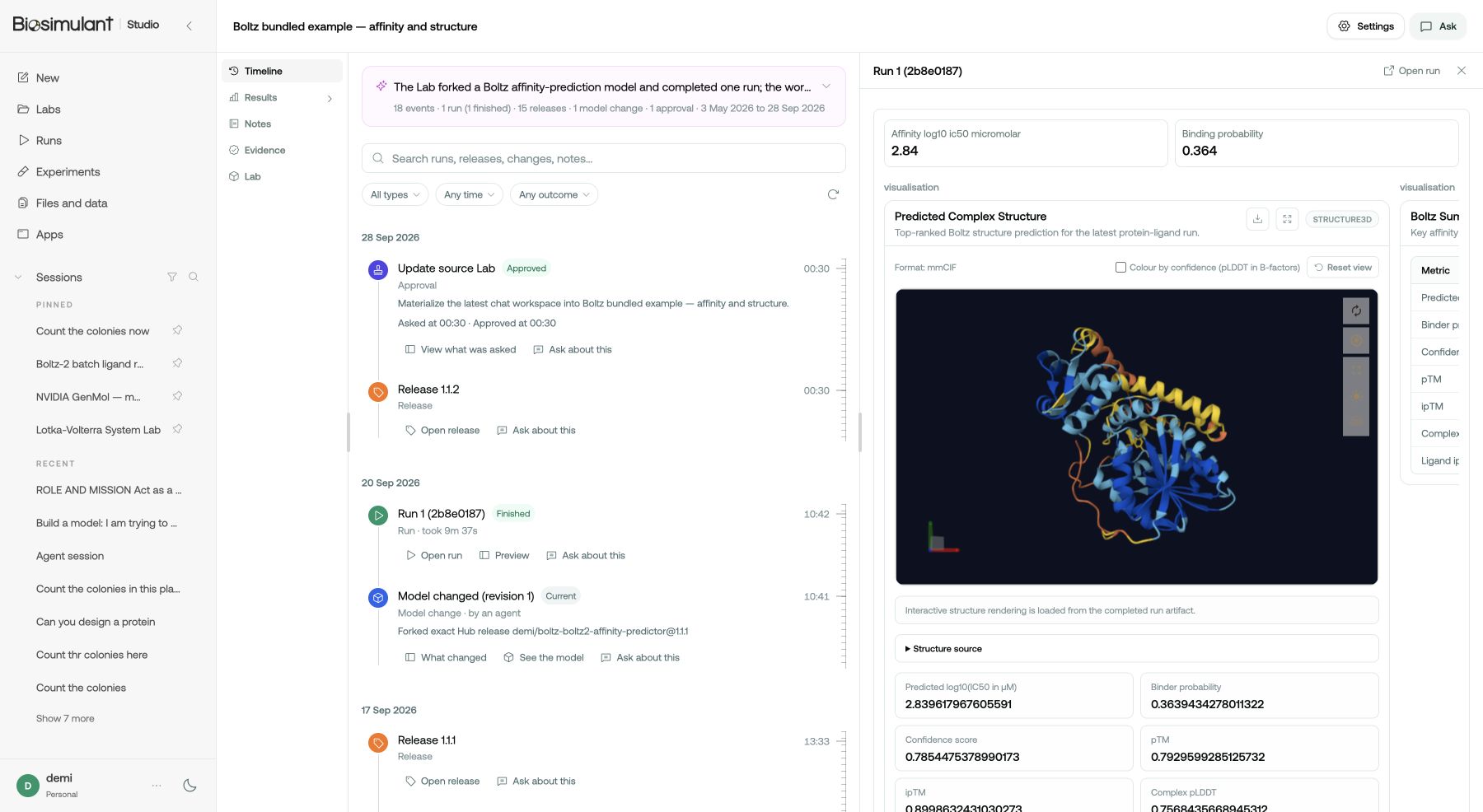
View the timeline of all activity in your session.
Connect your agent.
Connect the agent you already use to Biosimulant, then give it a research goal. Keep its work and results together in Studio.
Inspect what ran.
See the model, what went into it and what came out, all in one place. What the result cannot tell you sits right next to it.
Rerun the saved setup.
Go back to exactly how it was set up and run it again. When the setup stays put, you can see what actually changed.
Build on previous work.
Come back to a comparison, add another candidate, or hand the whole thing to a colleague.
Biosimulant, in five quick answers.
Why it matters, what you can do, and how to start.
As agents such as Codex and Claude take on more computational work, researchers need a way to connect that work to scientific tools, evidence, and team workflows.
Biosimulant is that workspace. It supports reproducibility and keeps the investigation together, so others can review, continue, and build on the work.
Give Codex, Claude, or another AI agent a research goal. Connected through Biosimulant's MCP server or plugin, it can help investigate evidence, work with data, build or adapt models, and run computational experiments.
You guide the investigation and review the work, while the workspace connects the tools and keeps the saved context together.
It means using code, data, or a model to investigate a question on a computer. You might compare how different conditions affect microbial growth or explore a predicted protein interaction.
The result helps inform your next question; its meaning depends on the method, assumptions, and evidence.
The plans, evidence, changes, and results saved through Biosimulant stay with the investigation. A run keeps its model version, inputs, settings, outputs, and log.
You can inspect how a result was produced, return to previous work, or continue with a colleague or another agent.
Open Studio and start with a research question. Connect Codex, Claude, or another AI agent through Biosimulant's MCP server or plugin.
You can begin by reviewing existing work and planning a next step, then move into computational experiments when the investigation needs them.
Watch one run, start to finish.
Model + inputs + run settings → saved experiment
What happens in the recording
- The agent connects to Biosimulant and finds it is already signed in.
- It sets up a Boltz-2 run from the example, then shows the settings, the hardware and what it will cost before anything starts.
- Nothing starts until someone approves that exact plan.
- The results come back with a binding probability and an affinity score, checked against the run's own record.
- Studio opens the lab: the inputs, the log, the Evidence Passport and the predicted structure.
Work on it as a team.
Everyone brings their own agent. Labs, runs and results land in one shared record the whole team can inspect and build on.
$39 per seat a month, with $10 of compute and $10 of AI per seat, pooled monthly. See pricing
One shared record
The work stays with the team, whoever started it.
Roles you control
Viewers read, Members build, run and publish privately, and Admins decide what goes public.
Your team's name
Releases publish under the team's namespace, and members can use its private ones.
Start an experiment you can come back to.
Begin in Studio or connect your agent. Keep the setup, results and context together as your investigation develops.